
FAQs vs. Knowledge Bases: Key Differences
FAQs and knowledge bases both help users find answers, but they serve different purposes. FAQs are quick-reference tools for common, straightforward questions. Knowledge bases, on the other hand, provide detailed, in-depth solutions for more complex issues. Here's how they differ:
- FAQs: Simple, single-page lists of common questions with short answers. Ideal for addressing basic queries like pricing or hours of operation. Best for small teams or businesses with limited, static information.
- Knowledge Bases: Organized repositories with categories, subcategories, and advanced search tools. Designed for detailed guides, troubleshooting, and evolving content. Suitable for technical products, growing businesses, or internal team documentation.
Quick Comparison
| Feature | FAQs | Knowledge Bases |
|---|---|---|
| Format | Simple Q&A list | Structured with categories |
| Search Options | Limited, manual scrolling | Advanced search functionality |
| Content Depth | Brief answers | Detailed, step-by-step guides |
| Best For | Basic, static info | Complex, evolving content |
| Ease of Updates | Manual and time-consuming | Scalable and easier to update |
Choosing the right tool depends on your needs. Use FAQs for quick, basic answers. Opt for a knowledge base for more complex or technical information, particularly if your business is scaling.
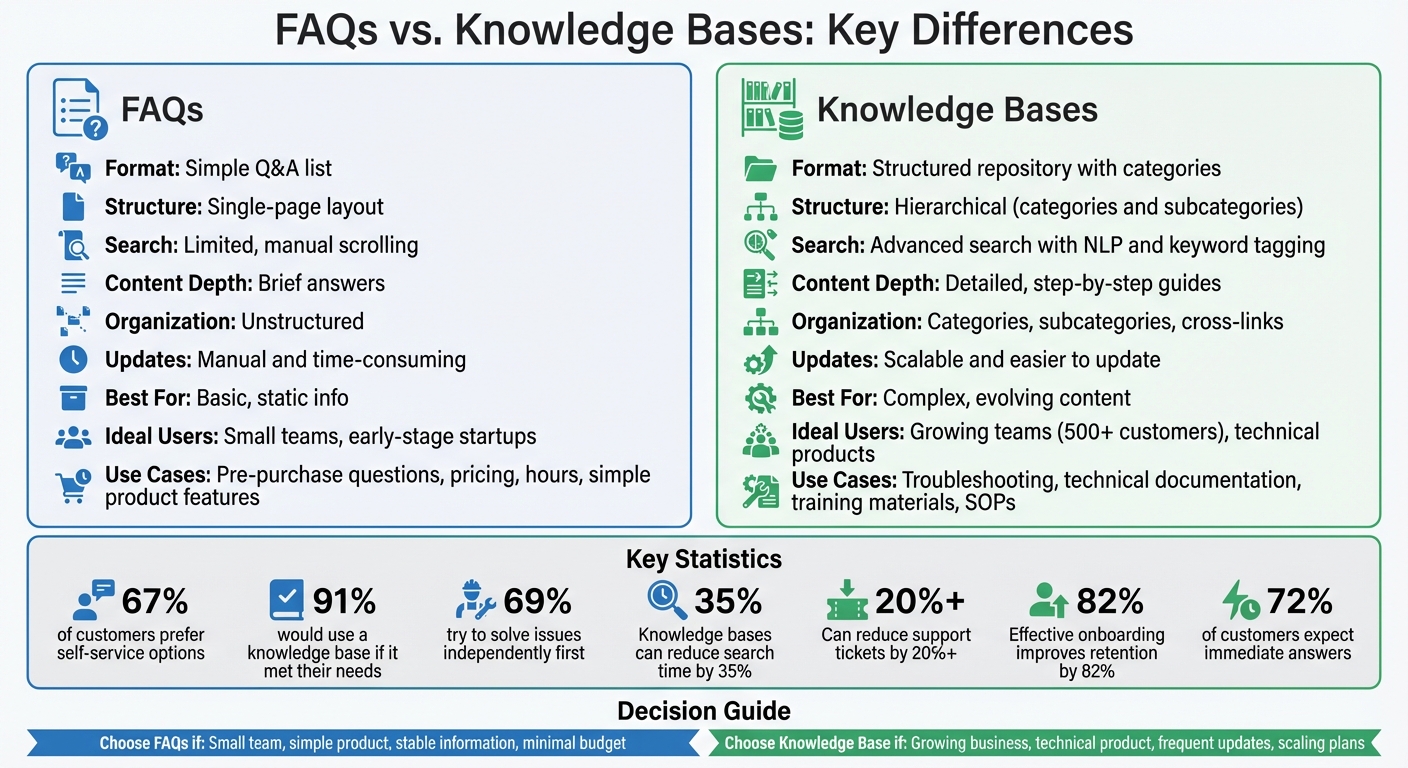
FAQs vs Knowledge Bases: Complete Feature Comparison Chart
Everything You Need to Know About a Knowledge Base
What Are FAQs?
FAQs, or Frequently Asked Questions, are lists of common questions paired with straightforward answers. They aim to address typical user queries before they escalate into support requests. The format is deliberately simple - a single webpage featuring bulleted lists, short paragraphs, and clear headings - making it easy for users to skim through quickly. This simplicity is what sets FAQs apart from more detailed resources like technical documentation.
FAQs are designed to offer quick, concise answers. They’re tailored for the 67% of customers who prefer self-service options instead of contacting a customer service representative. Plus, they’re accessible 24/7, accommodating various time zones and learning preferences.
The concept of FAQs dates back to 1982–1985, when Eugene Miya at NASA introduced the format to reduce repetitive ARPANET inquiries. Today, FAQs not only address customer concerns but also boost search engine rankings by providing regularly updated content that aligns with user search terms.
Main Features of FAQs
FAQs are characterized by their clean, single-page layout, which often includes bullet points and short paragraphs. This structure, combined with a consistent brand voice, makes them easy to read and understand. They deliver consistent answers across all platforms, ensuring clarity and reducing any potential confusion.
The hallmark of an FAQ is its brevity and clarity. Answers are designed to resolve questions quickly, without diving into complex details. If a topic requires multiple paragraphs, videos, or advanced troubleshooting, it’s better suited for a knowledge base rather than an FAQ. This streamlined approach makes FAQs cost-efficient and easy to manage, especially for businesses with a limited range of products.
When to Use FAQs
FAQs are most effective for pre-purchase questions and basic inquiries. For example, placing them on pricing pages can address common concerns about subscriptions, trials, or costs before potential customers need to ask. They’re also ideal for repetitive questions about product features, account settings, or general company details - issues that don’t need technical expertise to resolve.
FAQs are perfect for situations where users need quick answers rather than in-depth guidance. They’re particularly useful for businesses where customers rarely require detailed technical support. Strategically placing FAQs, like in the footer of high-traffic pages, enhances their accessibility. However, if an answer requires lengthy explanations or visuals, it’s better suited for a knowledge base. By efficiently handling pre-purchase and basic queries, FAQs play a key role in a proactive knowledge-sharing strategy, offering clear and direct benefits as a support tool.
What Are Knowledge Bases?
A knowledge base is essentially a digital hub where an organization stores its key information. Think of it as a one-stop shop for everything from how-to guides and technical manuals to company policies and troubleshooting instructions. Unlike FAQs, which provide quick answers, knowledge bases dive deeper, offering detailed, step-by-step solutions. This centralized setup also paves the way for more dynamic, AI-driven tools.
Today’s knowledge bases are no longer static libraries. They’ve become active systems, often powered by AI, delivering answers right where users need them - whether that's in tools like Slack, a CRM, or an in-app chat. This evolution addresses a common problem: the time wasted searching for information. In fact, a searchable knowledge base can cut search time by up to 35%. For businesses, this makes them a powerful tool for both internal teams and customer support.
Knowledge bases generally come in two types: internal and external. Internal ones are secured behind authentication, making them ideal for sensitive content like HR policies or training materials. External knowledge bases, on the other hand, are public-facing, designed to help customers solve problems or learn about products without needing to contact support. Both types typically organize their information using categories, subcategories, and tags to make navigation intuitive.
The benefits speak for themselves. About 91% of customers say they’d use a knowledge base if it met their needs, and 69% try to solve issues on their own before reaching out to support. For businesses, this reduces repetitive questions and speeds up resolutions. As Rami El-Abidin from HubSpot explains:
"A knowledge base is like the Constitution; it's a living document. It needs to evolve alongside your business, your products, and, most importantly, your customers' needs."
Main Features of Knowledge Bases
To deliver on their promise, knowledge bases come packed with essential features. A strong search function is at the heart of it all. Whether it’s AI-powered semantic search or traditional keyword-based tools, the goal is simple: help users find what they need fast. This is crucial because 72% of customers expect immediate answers when they’re looking for support. If they can’t find what they’re looking for quickly, they’re likely to give up and reach out to support instead.
Another standout feature is their organized structure. Content is grouped into logical categories and subcategories, often with cross-links to related topics. This setup not only makes navigation easier but also encourages users to explore more relevant content.
Modern knowledge bases also incorporate multimedia elements like videos, infographics, and screenshots to improve clarity. They’re backed by collaboration tools that let subject matter experts across departments contribute, edit, and validate content. Analytics tools further enhance the experience by tracking metrics like page views and abandoned searches. This data helps teams identify gaps in the content and make continuous improvements.
When to Use Knowledge Bases
Knowledge bases shine in situations that require detailed guidance. They’re perfect for complex products or services that need in-depth, multi-step instructions. For instance, if customers need help with troubleshooting, technical specifications, or advanced tutorials, a knowledge base is the go-to solution. Software companies often use them to document API integrations, product updates, and advanced features - topics that would overwhelm a basic FAQ page.
They’re also invaluable for internal operations and team collaboration. When information is scattered across emails, chats, or shared drives, employees waste time hunting for answers. A centralized knowledge base consolidates everything - from IT procedures and HR policies to sales scripts and marketing guidelines - into one searchable platform. This is especially helpful during onboarding, giving new hires instant access to company best practices and policies. In fact, effective onboarding with internal knowledge resources can improve new-hire retention by up to 82%.
Another major advantage is managing constantly changing documentation. For products that evolve with new features, software updates, or regulatory changes, a knowledge base ensures all information stays consistent by updating a single source. Regular audits, ideally every quarter, help keep the content relevant and accurate.
Finally, knowledge bases excel when detailed analytics and feedback are needed. Unlike FAQs, which offer limited tracking, knowledge bases provide robust reporting on user behavior, search trends, and content performance. Features like "Was this helpful?" buttons or user surveys allow real-time feedback, ensuring the resource adapts based on actual usage. This makes them a dynamic tool for continuous improvement.
sbb-itb-a0a3b44
How FAQs and Knowledge Bases Differ
Structure Comparison
FAQs and knowledge bases serve similar purposes but differ significantly in how they organize and present information. FAQs are usually simple, single-page layouts, often tucked into a website's footer or hosted on a dedicated page. They consist of a straightforward list of questions and answers, requiring users to scroll through to find what they need.
Knowledge bases, on the other hand, are far more structured. They feature a well-defined system with a homepage, categories, and subcategories, creating a web-like architecture where articles interlink for deeper exploration. While FAQs provide quick, concise answers to basic questions, knowledge bases delve into step-by-step guides, troubleshooting manuals, and even multimedia support. Simply put, FAQs handle straightforward queries, while knowledge bases tackle more complex issues.
Another key difference is in accessibility. FAQs rely on manual scrolling to locate information, whereas knowledge bases often come equipped with advanced search functionality, including natural language processing (NLP) for faster and more accurate results. Here's a quick breakdown of these differences:
Comparison Table: FAQs vs. Knowledge Bases
| Feature | FAQs | Knowledge Bases |
|---|---|---|
| Format | Simple list of questions and answers | Structured repository with categories and articles |
| Organization | Single-page layout | Hierarchical (categories and subcategories) |
| Search Options | Limited; relies on scrolling | Advanced search bar with keyword tagging and NLP |
| Information Depth | Concise and direct | Comprehensive and detailed |
| Flexibility | Static; difficult to update manually | Highly scalable and easy to update |
| User Experience | Quick reference for basic queries | Immersive self-service for complex problem-solving |
The scalability factor is another major distinction. FAQs require manual updates, which can be time-consuming and less efficient as the volume of information grows. In contrast, knowledge bases often use specialized software that simplifies updates, version control, and expansion. This makes them a better fit for organizations that need to provide timely and ever-evolving information.
Take modern tools like UnSoloMind (https://unsolomind.com) as an example. This platform integrates intuitive update features and AI-powered search capabilities, allowing teams to build and maintain dynamic repositories of information. By enabling quick updates and minimizing repetitive inquiries, solutions like these improve operational efficiency and ensure users have access to the information they need, when they need it. These differences underscore the importance of selecting the right tool for your needs, a topic explored further in the next section.
Choosing Between FAQs and Knowledge Bases
Deciding between FAQs and a knowledge base depends on factors like your team size, the complexity of your information, and your future growth plans. For smaller teams with straightforward products, a simple FAQ page often does the trick. As HelpSite highlights, even early-stage teams can save valuable time by addressing repetitive questions upfront, sparing developers or support staff from answering the same inquiries repeatedly. If your business mainly fields basic questions about pricing, location, or services, an FAQ page offers a low-maintenance solution that gets the job done.
On the other hand, if your product involves technical details or your support volume is climbing, a knowledge base becomes a must. A well-organized, searchable knowledge base can significantly cut down the time employees spend hunting for information - by as much as 35%. It also empowers customers to find answers on their own, potentially reducing support tickets by over 20%.
Your available resources also play a role. FAQs are budget-friendly and require minimal upkeep, making them ideal for businesses with stable, straightforward needs. In contrast, knowledge bases demand more upfront investment. They require specialized software, dedicated staff to create and manage content, and regular updates to ensure accuracy. As Intercom puts it:
"The main weakness of knowledge bases lies in the time, effort, and resources required to keep them accurate, relevant, and well-positioned to help customers' current needs."
Still, the trend is clear: 40% of C-level executives are prioritizing self-service options for customer support.
Platforms like UnSoloMind (https://unsolomind.com) simplify the process of managing a knowledge base. With AI-powered search and easy document uploads, even mid-sized teams can create searchable repositories without the hassle of traditional systems. This makes knowledge bases more accessible for businesses planning to scale.
When FAQs Work Best
FAQs shine when your team is small, your product is simple, and your information rarely changes. They’re perfect for businesses with limited resources or straightforward offerings, like early-stage startups, local service providers, or agencies. For example, an FAQ page can efficiently address common questions like "What are your hours?" or "Do you offer refunds?" without requiring complex tools or ongoing maintenance.
The beauty of an FAQ lies in its simplicity. It integrates easily into your website, requires little upkeep, and provides instant answers to users seeking quick clarifications. As KnowledgeOwl points out:
"FAQs are best as a gateway, not your entire support system."
If your product has a limited feature set and predictable needs, an FAQ page is often all you need.
When Knowledge Bases Work Best
For more complex products or growing businesses, a knowledge base offers the depth and flexibility that FAQs can’t match. If your product requires detailed setup guides, troubleshooting steps, or technical documentation, a knowledge base provides the structure your users need. This is especially critical for SaaS companies, technical products, or organizations with expanding customer bases - particularly since 67% of customers prefer self-service over contacting support.
Knowledge bases also benefit internal teams by centralizing standard operating procedures, training materials, and company policies. Platforms like UnSoloMind (https://unsolomind.com) enhance these capabilities with AI-powered search tools, allowing teams to upload documents and interact with information through intelligent chat. This reduces time spent searching for answers and minimizes repetitive questions across departments.
With built-in analytics, knowledge bases can track popular search topics, highlight content gaps, and measure how well they’re addressing user needs. As Slack notes:
"A knowledge base is not a set-it-and-forget-it tool. To keep performing at peak potential, it requires continuous improvement based on how your team actually uses it."
If your business plans to integrate AI chatbots, support multilingual users, or scale beyond 500 customers, investing in a knowledge base is the way to go.
Decision Table: FAQs vs. Knowledge Bases
| Factor | When to Choose FAQs | When to Choose a Knowledge Base |
|---|---|---|
| Team Size | Small teams and early-stage startups | Growing teams serving 500+ customers |
| Information Volume | Common questions fit on a single page | Content exceeds a single-page format |
| Product Complexity | Simple products with limited features | Technical products requiring detailed guides |
| Update Frequency | Information rarely changes | Content needs regular updates and expansion |
| Budget | Minimal support budgets | Resources for dedicated software and maintenance |
| User Needs | Quick answers to basic questions | In-depth troubleshooting and self-service support |
| Growth Plans | Stable businesses with predictable needs | Scaling organizations with significant expansion |
| Internal Use | Limited documentation needs | Centralizing SOPs and training materials |
Conclusion
FAQs are an excellent way to provide quick, straightforward answers to common questions like pricing, business hours, or product features. They’re easy to create, require little upkeep, and help lighten the load on your support team by addressing repetitive inquiries before they turn into support tickets. For small businesses with stable products and predictable questions, an FAQ page can be a practical, low-effort solution that delivers immediate benefits.
On the other hand, knowledge bases shine when you need to offer in-depth guidance. They’re perfect for technical documentation, troubleshooting, and training materials. With advanced search features, detailed analytics, and the ability to grow alongside your business, knowledge bases are ideal for companies handling more complex support needs or planning for future expansion. By understanding the strengths of each tool, you can ensure you’re using the right one for the job.
The choice ultimately comes down to your specific needs. If your content is simple, static, and fits neatly on a single page, an FAQ page is likely sufficient. However, if you’re managing intricate questions, scaling your operations, or looking to centralize internal processes, a knowledge base is the smarter investment.
Modern platforms like UnSoloMind (https://unsolomind.com) simplify this process with AI-powered search and smart document management tools. Whether you opt for FAQs, a knowledge base, or a combination of both, the goal is the same: deliver the right information to the right people at the right time. This reduces repetitive questions and allows your team to focus on more impactful tasks.
Pick the tool that fits your needs today, and be ready to adapt as your business grows.
FAQs
How can I decide whether to use an FAQ page or a knowledge base for my business?
When deciding between an FAQ page and a knowledge base, it all comes down to the type and depth of information you need to provide. An FAQ page works well for tackling a handful of common questions with quick, no-frills answers. It’s a great option if you want a straightforward way to address recurring inquiries without overwhelming your audience.
A knowledge base, however, is designed for more detailed and searchable content. It’s perfect for businesses with complex products, regular updates, or the need for extensive documentation. This tool can house step-by-step guides, troubleshooting instructions, and other in-depth resources. Plus, it’s not just for customers - internal teams can also benefit from having a centralized hub of information, cutting down on support tickets and boosting productivity.
For businesses needing a scalable solution, UnSoloMind is a fantastic option. It allows you to build a smart, searchable knowledge base by uploading documents, notes, and FAQs. With its AI-powered chat feature, users get instant answers, helping you streamline support and focus on growing your business.
Why is a knowledge base better than an FAQ for complex products?
A knowledge base goes beyond the simplicity of a traditional FAQ by offering a more structured and detailed approach to information. Unlike FAQs, which are typically just static lists of question-and-answer pairs, a knowledge base organizes content into categories, tags, and in-depth articles. This setup allows for the inclusion of step-by-step guides, configuration manuals, video tutorials, and glossaries - all tailored to support complex products or services.
This robust format enables users to find the answers they need on their own, cutting down on support requests and enhancing customer satisfaction. It's not just for customers, though. A well-built knowledge base also serves internal teams by acting as a centralized resource for onboarding, training, and even AI-powered chat tools. Platforms like UnSoloMind simplify the process of building a smart, searchable knowledge base, making workflows smoother and more effective for everyone involved.
Can small businesses use a knowledge base effectively, or is it only for larger companies?
Yes, small businesses can absolutely handle a knowledge base - it’s not something exclusive to large companies. By centralizing information, a knowledge base makes it easier for both customers and employees to quickly find the answers they need. This not only cuts down on support requests but also frees up valuable time to focus on growing the business.
Modern tools like UnSoloMind make the process even easier by leveraging AI to organize, search, and suggest content. This reduces the need for manual effort, making it a practical solution for smaller teams. Even startups can enjoy the benefits of increased efficiency, a smoother customer experience, and better internal collaboration with a well-maintained knowledge base.