
How AI Improves Asynchronous Knowledge Sharing
Teams waste time searching for information, recreating work, or interrupting colleagues for answers, or answering the same questions daily. AI solves this by making knowledge easy to find, share, and use asynchronously.
Here’s how AI transforms the way we handle information:
- Smarter Search: AI understands intent, connects related terms, and delivers tailored, actionable answers.
- Automated Documentation: It organizes emails, chats, and meeting notes into searchable content without extra effort.
- Efficient Collaboration: AI helps teams work across time zones by summarizing updates and reducing delays.
With tools like UnSoloMind, teams create centralized, searchable knowledge hubs and use AI chat for quick answers, saving time and cutting interruptions. This shift helps employees focus on meaningful work instead of chasing information.
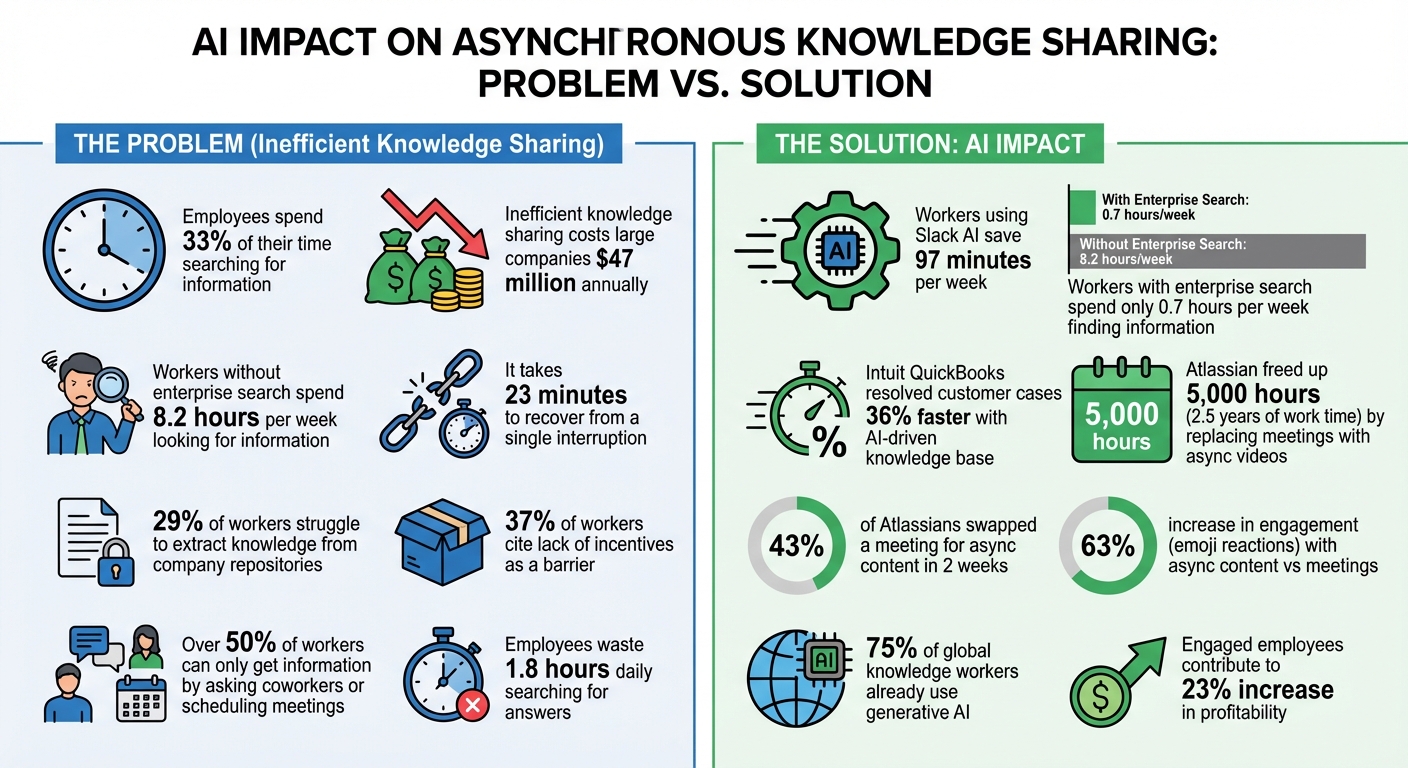
How AI Transforms Knowledge Sharing: Key Statistics and Time Savings
Ready, Set, AI: Preparing for Knowledge Management Success | Atlassian
How AI Improves Asynchronous Knowledge Sharing
AI tackles the inefficiencies that often plague traditional knowledge sharing. Instead of wasting time searching through scattered files or interrupting colleagues for answers, AI provides context-aware organization and instant solutions, anytime and anywhere.
The impact is clear in three major areas: smarter search that understands your intent, automated knowledge capture to preserve vital information, and seamless collaboration across time zones without requiring everyone to be online at the same time. Let’s dive into how AI drives these advancements.
AI-Powered Search and Information Retrieval
Traditional keyword searches often fall short because they rely on exact word matches. For example, searching for "budget planning" might miss relevant documents labeled "financial forecasting." AI-powered search changes the game by using natural language processing to grasp the meaning behind your query, connecting related terms and concepts seamlessly.
AI doesn’t just retrieve data - it synthesizes information from multiple sources to provide direct, actionable answers.
Take Intuit QuickBooks, for instance. In January 2026, the company implemented an AI-driven knowledge base directly into Slack for its support teams. This system allowed representatives to search documentation and past tickets using natural language. The result? Customer cases were resolved 36% faster, and the company saw a noticeable boost in its Net Promoter Score (NPS).
AI also personalizes search results based on the user’s role and context. For example, when a salesperson and a marketer both search for "quarterly results", the AI tailors the information to match their specific needs. Additionally, AI can identify gaps in the knowledge base by analyzing failed searches and proactively suggesting resources to fill those gaps.
| Feature | Traditional Keyword Search | AI-Powered Knowledge Search |
|---|---|---|
| Matching Logic | Exact word matches | Semantic understanding and intent recognition |
| Data Scope | Limited to one repository | Cross-platform (Chat, Email, Docs, CRM) |
| Output | List of links/documents | Synthesized answers and summaries |
| Context | Static results for all users | Personalized by role and search history |
Next, let’s explore how AI revolutionizes the way knowledge is captured and stored.
Capturing and Storing Knowledge
AI addresses the challenge of preserving institutional knowledge by automating the documentation process. Instead of relying on employees to manually record everything, AI converts emails, chat logs, and meeting recordings into searchable, context-rich content.
This approach transforms static knowledge repositories into what Forrester Principal Analyst Julie Mohr describes as "living systems":
"GenAI provides an opportunity to embed knowledge into workflows in a seamless way. It enables organizations to work with knowledge as something dynamic that can be generated, adapted, and reconfigured in real time."
AI also captures hidden expertise buried in support tickets, Slack conversations, and meeting notes. It categorizes and tags new content automatically, ensuring the knowledge base stays updated without requiring extra effort from employees.
Better Collaboration Across Time Zones
AI takes asynchronous collaboration to the next level, enabling teams spread across different time zones to work more efficiently. It eliminates delays caused by waiting for responses, as AI-powered summarization allows team members to quickly catch up on conversations or updates they missed while offline.
As Atlassian Senior Product Manager Will explains:
"My team is across the globe, so Loom has been a great way for us to all stay in sync, async. The 'show, don't tell' nature leads to higher quality interactions."
AI enterprise search tools also empower employees to find answers across platforms like Google Drive, Slack, and Confluence without needing to rely on colleagues for help. In fact, workers using Slack AI report saving an average of 97 minutes per week thanks to streamlined search and collaboration features.
Modern AI systems go beyond simple information retrieval by proactively delivering insights tailored to a user’s role and ongoing projects. This ensures that the right information appears exactly when and where it’s needed, making collaboration smoother and more effective.
UnSoloMind: AI Features for Asynchronous Knowledge Sharing
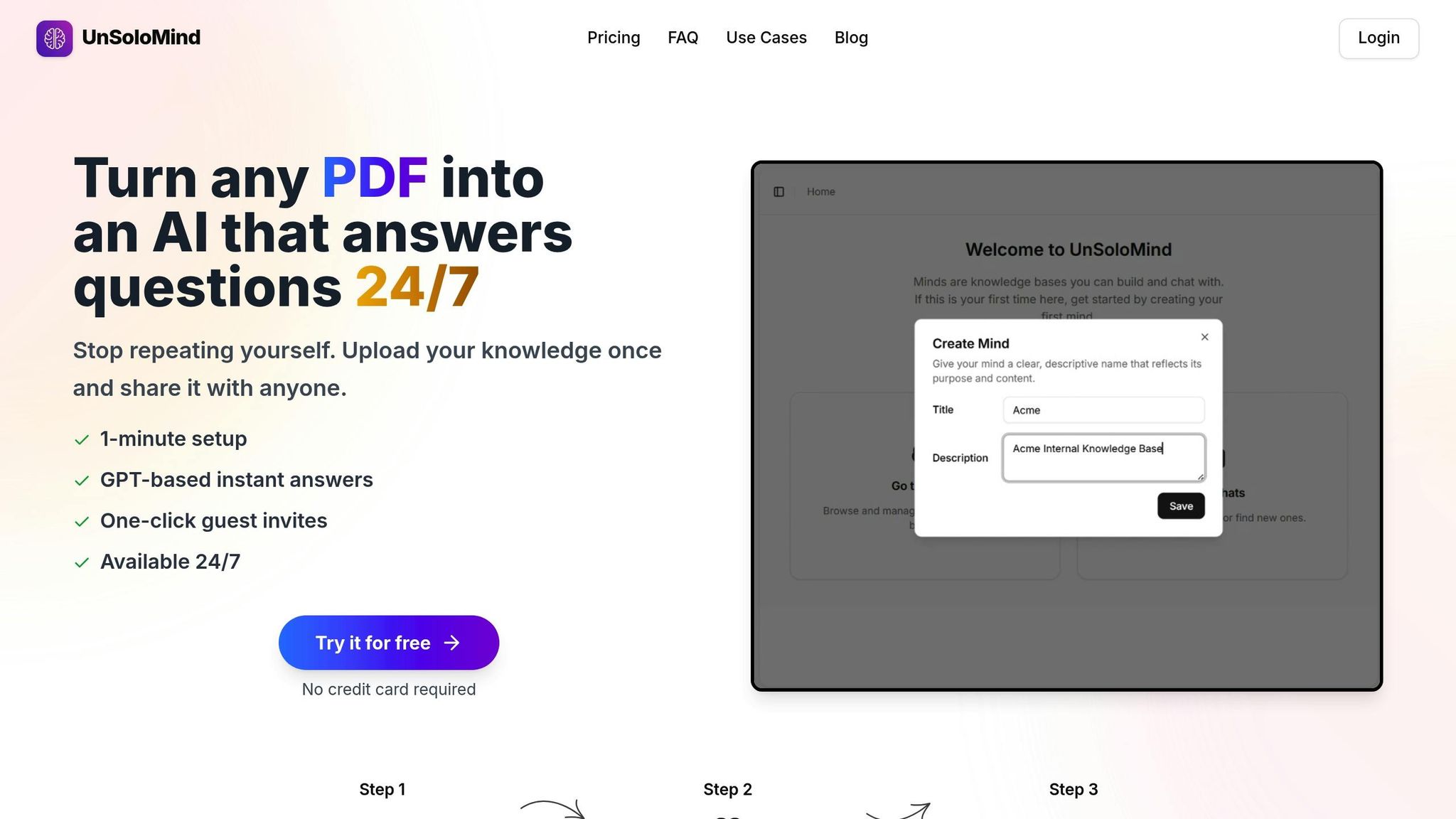
UnSoloMind tackles the typical challenges of knowledge sharing by transforming documents into an intelligent, always-available resource. By using AI, it moves teams away from the outdated "push-based" approach - where content is published with the hope that someone will find it - toward a "pull-based" model. This allows employees to retrieve exactly the information they need, precisely when they need it.
Building a Smart Knowledge Base
UnSoloMind enables teams to create dedicated knowledge hubs, called "Minds", where all critical information is stored in one easily searchable location. Users can upload documents in formats like PDFs, DOCX, and TXT, which the platform converts into plain text for AI processing. Each Mind acts as a centralized repository, making documents, notes, and FAQs instantly accessible to authorized users.
With advanced sharing controls, Mind owners can precisely manage who has access - be it internal team members, external clients, or specific collaborators. Only the owner requires an active subscription, while collaborators can access the knowledge base using credits from the owner's account. To streamline workflows further, the platform integrates seamlessly with conversational interfaces.
AI Chat for Instant Answers
The AI chat feature simplifies how teams interact with their documentation. Instead of scrolling through long files or interrupting coworkers, users can ask questions in natural language and receive concise, AI-generated answers from the stored content. This feature addresses the common issue of fragmented knowledge by consolidating information into a single, conversational interface. Queries to the standard AI model cost 5 credits each, while more advanced reasoning queries cost 20 credits.
This functionality also reduces repetitive questions by identifying commonly asked queries and providing consistent answers anytime. Maddie Wolf, Head of Operations at Legion, highlights the value of this approach:
"The 'single source of truth' paradigm fails to acknowledge how information actually exists in modern organizations. Knowledge doesn't neatly reside in SharePoint or EGain - it flows dynamically through Salesforce, Slack, Teams, SAP, Oracle, Workday, and countless other systems".
By consolidating scattered information, UnSoloMind helps teams reclaim the 1.8 hours employees typically spend daily searching for answers.
Pricing Plans and Features
UnSoloMind offers three pricing options to suit different team sizes and needs:
| Plan | Price | Credits | Minds | Users | Best For |
|---|---|---|---|---|---|
| Basic | $9/month | 2,000 | Up to 5 | Up to 5 | Small teams exploring asynchronous workflows |
| Pro | $19/month | 10,000 | Up to 100 | Up to 100 | Growing teams with extensive documentation |
| Enterprise | $99/month | 50,000 | Unlimited | Unlimited | Large organizations needing priority support |
All plans come with access to the GPT-4o Mini model and offer the flexibility to cancel anytime during the month. The Enterprise plan also includes priority support for organizations managing large-scale knowledge bases.
sbb-itb-a0a3b44
How to Add AI to Your Asynchronous Workflow
Integrating AI into your asynchronous workflow requires adjustments to how your team handles documentation, communication, and information access. With 75% of global knowledge workers already using generative AI - and nearly half adopting it within the last six months - success hinges on establishing effective practices right from the start.
Start by auditing your documentation. Gaps, duplicates, or outdated materials can mislead AI systems, so it’s crucial to clean up your knowledge base. Simplify ambiguous language, as AI depends on clear, precise content. Afterward, organize your materials using "chunking" and metadata - like titles, sections, "last updated" dates, and priority tags. This structure improves how AI retrieves and prioritizes relevant information.
Seamless integration works best when AI tools are embedded into the platforms your team already uses. Embedding AI directly into existing workflows reduces context switching and speeds up responses, addressing common challenges tied to disorganized content.
Encourage a "search first, ask last" approach to preserve focus time. Team members should rely on AI-powered search tools to find answers in existing documentation before reaching out to colleagues. Workers with access to enterprise search spend just 0.7 hours per week looking for information, compared to 8.2 hours for those without such tools. Additionally, use feedback tools - like "thumbs up/down" buttons on AI responses - to refine accuracy and relevance over time.
These strategies create a strong foundation for incorporating AI into your asynchronous workflow.
Building a Documentation Culture
A solid documentation culture is essential for successful AI integration. Without quality documentation, AI tools have no foundation to work with. As Erin Mosbaugh, Work-Focused Content Strategist at Atlassian, explains:
"When information lives in inboxes, DMs, or people's heads, AI can't help you – because AI can't surface what isn't documented online".
The shift starts with leadership. Engaged employees contribute to a 23% increase in profitability, and engagement begins when leaders actively model knowledge-sharing behaviors. Employees also need to feel safe documenting their expertise without fearing competition or job insecurity. To encourage participation, offer career-based incentives or recognition - 37% of workers cite a lack of incentives as a major barrier to effective knowledge management.
Replace real-time meetings with documented updates whenever possible. For example, in March 2024, Atlassian's Team Anywhere Lab launched a challenge to replace one meeting with a Loom video. Within two weeks, 43% of Atlassians swapped a meeting, freeing up 5,000 hours for focused tasks - equivalent to 2.5 years of working time. The initiative also led to a 63% increase in emoji reactions, showing greater engagement with asynchronous content compared to traditional meetings. As Marques, Communications Manager at Atlassian, noted:
"Using Loom disrupts the pattern of waiting until the 'next meeting' to talk through a topic … Being able to record a Loom means I don't have to wait, and neither do my colleagues".
Assign clear ownership of topics and schedule regular reviews - at least quarterly - to keep your knowledge base accurate and up-to-date. Automated tagging can further streamline information, making it easier for AI to retrieve the right details. Platforms like UnSoloMind allow teams to create dedicated "Minds" for different projects, each with its own structure and access controls, ensuring documentation remains manageable and relevant.
With a strong documentation culture in place, AI can better extract and deliver information, enhancing the asynchronous workflow.
Reducing Interruptions for Deep Work
Interruptions can wreak havoc on productivity, with research showing it takes about 23 minutes to recover from a distraction. When over half of workers say they can only get necessary information by asking a coworker or scheduling a meeting, AI-powered tools can break this cycle by providing instant access to information without human involvement.
For meetings that are unavoidable, adopt a "Page-Led Meetings" approach. Start with a concise document outlining the context and goals, and spend the first 10 minutes silently reading and commenting. This creates a living record that AI can later reference, reducing the need for follow-ups. As Edward Brown, author of The Time Bandit Solution, puts it:
"Interruptions diminish high-quality execution by breaking momentum, thus resulting in the need for distressful do-overs".
UnSoloMind’s AI chat feature addresses interruptions head-on. Instead of messaging colleagues for quick answers, team members can ask the AI directly in natural language. The system offers concise responses based on stored content, preserving focus time for the whole team. For instance, during a time-sensitive contract renewal, a senior engineer at Wayfair used Slack AI to ask, "What's the latest on the contract?" and received immediate, documented details - no interruptions required.
Writing Clear Asynchronous Messages
The clarity of your asynchronous communication plays a key role in how effectively AI tools perform. Well-structured, actionable messages not only help your team but also enable AI systems to process and retrieve relevant information.
Use structured content with categories, tags, and clear hierarchies to make AI segmentation more effective. When using tools like UnSoloMind, upload files in formats like PDFs, DOCX, or TXT, which the platform converts to plain text for AI processing. Adding metadata - such as titles, sections, and "last updated" dates - further enhances the AI's ability to surface the most relevant results.
Always "show your work" by linking to source documents in your messages or AI queries. This builds trust and allows others to verify or correct information if needed. Additionally, use status flags like "Work in Progress", "Ready for Feedback", or "Official Guidance" to help both team members and AI understand which content is reliable.
Before rolling out AI, take time to rewrite existing documentation for clarity. A content audit can help identify and fix vague or confusing language. This is especially critical given that 29% of workers struggle to extract knowledge from company repositories. Clear, well-organized writing ensures that AI can retrieve the right information and strengthens your asynchronous communication overall.
Conclusion: AI and the Future of Asynchronous Knowledge Sharing
AI is reshaping how teams share knowledge, making it easier to collaborate across time zones and schedules. Instead of relying on outdated wikis, dynamic AI-powered knowledge bases now provide instant, context-specific answers. Why does this matter? Employees spend about 33% of their time just searching for information, and inefficient knowledge sharing costs large companies an average of $47 million annually. AI tools tackle these challenges head-on by consolidating scattered data from platforms like Slack and Google Drive into one searchable system.
These advancements aren't just theoretical - they’re becoming part of everyday workflows. Tools like UnSoloMind are making AI-driven knowledge sharing accessible to teams of all sizes. By creating smart, searchable knowledge bases with AI chat capabilities, teams can cut down on interruptions and protect focus time. For growing businesses, the platform’s Enterprise plan ($99/month) supports unlimited Minds and users, ensuring scalability without unnecessary limits.
Looking ahead, the potential of AI is even more exciting. The rise of autonomous AI agents - systems capable of independently handling complex tasks - is already underway. For example, Google Deep Research can compile detailed reports without human input. As these systems evolve, they’ll further streamline fragmented information, making it easier for teams to access actionable insights. Maddie Wolf, Head of Operations at Legion, highlights the challenge AI is solving:
"Knowledge doesn't neatly reside in SharePoint or EGain - it flows dynamically through Salesforce, Slack, Teams, SAP, Oracle, Workday, and countless other systems".
AI bridges these gaps, delivering precise insights exactly when and where they’re needed.
But technology alone isn’t enough. Joel Lim from 1up.ai emphasizes the importance of strong foundational practices:
"AI systems are only as strong as their source material, user engagement, and data governance practices".
The organizations that pair AI tools with robust documentation, clear feedback processes, and integrated workflows will see the biggest productivity boosts. This approach allows teams to shift their focus from searching for answers to tackling strategic, high-value work.
FAQs
How does AI help remote teams share knowledge more effectively?
AI takes scattered documents, notes, and FAQs and turns them into a centralized, searchable knowledge hub that your team can access anytime. Thanks to natural language processing, it provides clear, instant answers to questions, cutting down the need for real-time help and saving time spent hunting for information.
It doesn’t stop there - AI also keeps content organized and up to date automatically, so your team always has the most current guidance. For remote teams, this means fewer disruptions, quicker onboarding, and a boost in productivity, all while maintaining an easily accessible record of shared knowledge.
How does AI-powered search improve knowledge sharing compared to traditional keyword search?
AI-driven search tools take things up a notch by offering context-aware, natural language answers instead of just matching keywords. This means users get more accurate, relevant information that aligns with their specific roles or needs. It’s like having a search engine that truly understands what you’re asking for.
These tools can save teams 5–8 hours a week by cutting down the time spent hunting for information. Plus, they help reduce repetitive questions by 25%, boosting overall efficiency and teamwork. Unlike older search methods, AI solutions deliver results that are not only faster but also smarter and more precise, making them a game-changer for productivity.
How can organizations use AI to improve knowledge sharing and streamline workflows?
Organizations can bring AI into their workflows by embedding AI-powered knowledge bases directly within the tools their teams already use, like communication apps or SaaS platforms. This turns static documents into interactive, searchable resources, offering quick answers and cutting down on the time wasted searching through multiple systems.
A simple way to start is by uploading existing documents, FAQs, and policies into an AI-driven platform. Team members can then use a chat interface to interact with the knowledge base, getting instant answers to common questions. This approach not only eliminates repetitive inquiries but also streamlines daily operations.
To make the most of this system, organizations should keep the knowledge base up to date with the latest information. AI can assist by tagging, summarizing, and organizing content automatically. Providing clear usage guidelines and offering brief training sessions can help employees feel confident using the system, turning AI into a powerful tool for smarter, more efficient knowledge sharing.